
Download FlashPlayer Plus – free, secure Flash player, downloader and converter for Windows
Overview
FlashPlayer Plus is a lightweight, trial‑version utility that combines the classic Flash playback experience with powerful download, management and conversion tools. First introduced to the catalog in 2005, the software has amassed more than 81,000 downloads and continues to attract users who need a reliable way to view legacy Flash content after Adobe discontinued support. The current 2.6 build, updated on September 16 2005, runs on Windows 98 and later, making it compatible with a broad range of legacy systems still in use across small businesses and educational institutions.
Despite its age, FlashPlayer Plus retains a modern feel thanks to an improved progress bar and drag‑and‑drop playlist support, allowing users to queue multiple Flash files for seamless playback or batch conversion. Because the program is categorized under “Browsers → Browser tools,” it sits comfortably alongside other utility‑focused applications rather than a full‑blown web browser. Its small footprint means it consumes far less disk space than typical browser suites, which is especially valuable for users operating on older hardware with limited storage.
The interface is offered in English and the software enjoys popularity in the United States, India, and Thailand, where users often rely on legacy Flash sites for education, entertainment, and training. In short, FlashPlayer Plus delivers a secure, free solution for anyone who still needs to interact with Flash content, while also providing the convenience of downloading and converting those files into more contemporary formats.
Key Features
- Flash Playback Engine – Supports SWF, FLV and other legacy Flash formats with smooth rendering.
- Integrated Downloader – Capture Flash videos from websites directly into your local library.
- Batch Conversion – Convert Flash files to MP4, AVI or WMV without needing third‑party codecs.
- Playlist Management – Drag‑and‑drop playlist support lets you organize multiple files for sequential playback.
- Improved Progress Bar – Visual feedback during download or conversion helps you monitor tasks in real time.
- Low System Footprint – Requires less than 20 MB of disk space and minimal RAM, perfect for older PCs.
- Windows Compatibility – Runs on Windows 98, ME, 2000, XP, Vista, and newer versions up to Windows 10.
- Secure Execution – Operates in a sandboxed environment to reduce exposure to malicious Flash content.
- Trial‑Only Model – Free to download and test, with optional upgrade paths for extended features.
Installation, Usage & Compatibility
Getting FlashPlayer Plus up and running is straightforward, even for users who are not technically inclined. Follow these steps to ensure a smooth installation:
- Download the Installer – Click the “Download FlashPlayer Plus” button below the article. The file is a compact
.exepackage (~12 MB) that can be saved to any folder on your PC. - Run as Administrator – Right‑click the installer and select “Run as administrator.” This grants the necessary permissions to write to the
Program Filesdirectory and register the player’s codec. - Follow the Wizard – The setup wizard will guide you through license acceptance, destination folder selection, and optional shortcut creation. Because FlashPlayer Plus is a trial version, you’ll be prompted to register after the 14‑day evaluation period if you wish to continue using premium features.
- Finalize Installation – Once the wizard completes, the program automatically registers the Flash playback engine with Windows Media Player, allowing you to open SWF files directly from Explorer.
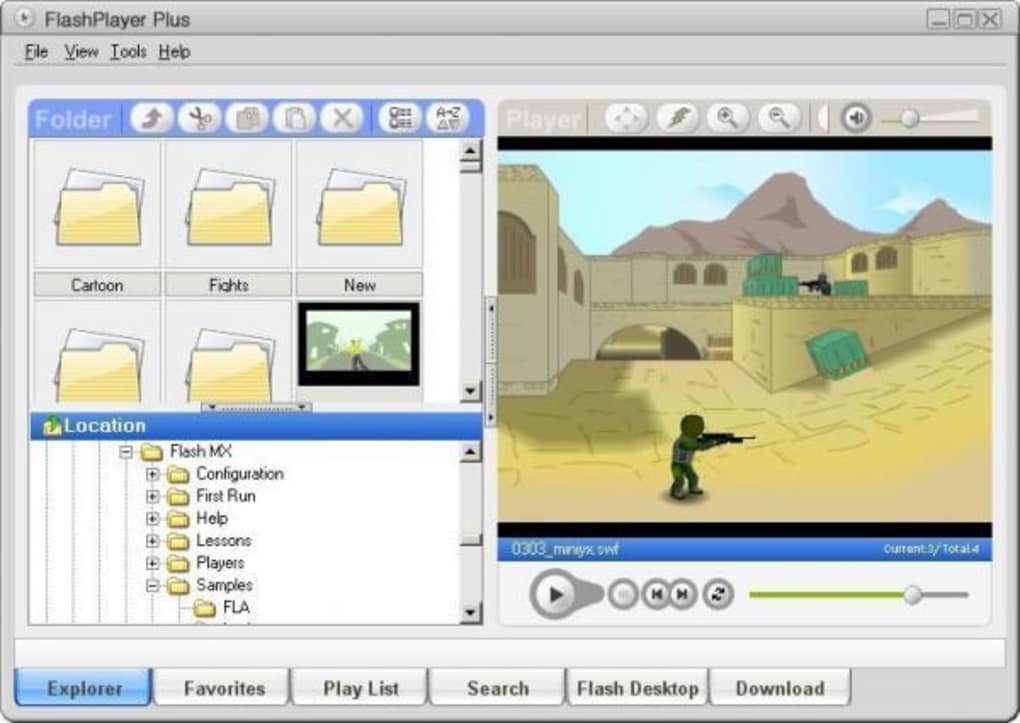
After installation, launch FlashPlayer Plus from the Start menu or desktop shortcut. The main window is divided into three panels: a file browser on the left, a playback area in the center, and a conversion toolbar on the right. To play a file, simply double‑click it in the browser panel or drag it onto the playback area. For downloading, paste the URL of a Flash video into the download field, choose a destination folder, and click “Start.” The integrated converter works similarly: select a source file, pick the desired output format from a dropdown menu, and press “Convert.” The progress bar at the bottom of the window provides real‑time feedback for both downloading and converting tasks.
Compatibility – FlashPlayer Plus is officially supported on Windows 98 and later, including Windows 2000, XP, Vista, 7, 8, and 10. Although the software was designed before Windows 11’s release, it continues to function in compatibility mode on newer systems. Users on macOS, Linux, Android or iOS will need to run the program through a Windows virtual machine or use an alternative Flash player, as the application is built exclusively for the Windows platform.
Because the program is a trial version, it may display occasional reminders encouraging you to purchase a full license. These prompts are non‑intrusive and can be dismissed until the trial period ends. Overall, the installation process takes under five minutes, and everyday usage requires only a few clicks, making FlashPlayer Plus an accessible solution for both novices and power users.
Pros & Cons
Advantages
- Lightweight and fast – consumes minimal system resources.
- All‑in‑one solution – playback, download, and conversion in a single interface.
- Supports legacy Windows versions, extending the life of older hardware.
- Drag‑and‑drop playlist makes batch operations effortless.
- Improved progress bar offers clear visual feedback.
- Free trial with optional upgrade path.
Disadvantages
- Only available for Windows – no native macOS, Linux, Android or iOS version.
- Trial version imposes a 14‑day usage limit for premium features.
- Interface feels dated compared to modern media players.
- Conversion formats limited to MP4, AVI, and WMV; no support for newer codecs like HEVC.
- No built‑in browser; must rely on external links for downloading.
Overall Rating: 4 out of 5 stars
The software shines for users who need a dependable way to handle legacy Flash content on Windows machines. While the UI could use a modern facelift and platform support is limited, the core functionality remains robust and secure.
FAQ & Conclusion
Is FlashPlayer Plus still safe to use after Adobe discontinued Flash?
Yes. FlashPlayer Plus runs Flash content in a sandboxed environment that isolates it from the rest of the system, reducing the risk of security vulnerabilities. However, always keep the application updated and avoid loading files from untrusted sources.
Can I convert Flash videos to modern formats like MP4?
Absolutely. The built‑in converter supports MP4, AVI and WMV outputs. Simply select the source SWF or FLV file, choose MP4 as the target format, and click “Convert.” The process typically finishes within a few minutes depending on file size.
What Windows versions are officially supported?
FlashPlayer Plus supports Windows 98, ME, 2000, XP, Vista, 7, 8, and 10. It also runs in compatibility mode on Windows 11, though this configuration is not officially listed.
Is there a way to remove the trial reminders without purchasing a license?
The trial reminders are part of the licensing model and cannot be disabled permanently without an upgrade. Users can dismiss each reminder temporarily, but they will reappear after each session once the trial period ends.
How much disk space does FlashPlayer Plus require?
The installer is approximately 12 MB, and the installed application occupies less than 20 MB on disk. This low footprint makes it ideal for older machines with limited storage.
Final Thoughts
FlashPlayer Plus fills a niche that many modern browsers have abandoned: the ability to play, download, and convert legacy Flash content on Windows PCs. Its lightweight design, straightforward interface, and bundled conversion tools make it an attractive option for users who still rely on Flash for educational modules, corporate training, or nostalgic entertainment. While the lack of native macOS or mobile support and the trial‑only limitation may deter some, the overall value‑for‑free proposition remains compelling. If you need a secure, no‑cost way to keep older Flash assets accessible, downloading FlashPlayer Plus today is a sensible step. Click the button below to start your download and experience a hassle‑free Flash solution that still works in today’s computing environment.
Free – Download FlashPlayer Plus






